Photo Editor by BeFunky
- 3.7
- Rating
- 10.00M
- Installs
- Free
- Price

 Analysis by App-foxy
I usually judge a photo editor by what happens after the first few minutes of enthusiasm. Can I make a useful image quickly, return to a project without confusion, and get a result that looks intentional rather than overloaded with effects? Photo Editor by BeFunky is built around that practical question. It combines photo editing, collage creation, and simple graphic design in one free photography app, so it is aimed at people who want more than a basic crop but do not necessarily want to learn a professional desktop editor.
I tested it with the kind of jobs I would actually give to a phone editor: improving a family snapshot, preparing several pictures for a shared album, arranging images into a collage, and making a small visual for a message or social post. My overall impression is that it is approachable and flexible, especially when I want a guided creative workflow. It is less convincing when I need highly exact retouching, deep layer control, or a completely distraction-free experience.
How it works when several people share one phone
The most natural household use is a shared device where different people want different levels of control. One person may want to brighten a dark indoor photo, another may be interested in a collage, and someone else may only need to add text to an image. BeFunky makes sense in that situation because those tasks sit close together instead of requiring separate specialist apps. I can open the editor for a quick correction, move to the collage tools for a group of pictures, or use the design side when a plain photo is not enough.
You May Also Like

 Blood Strike: 2.5 Anniversary
Blood Strike’s Loadouts Turn Every Drop Into a Tactical Gamble
A close look at Blood Strike’s custom loadouts: how fast access to signature weapons reshapes its battle royale rhythm, rewards preparation, and narrows the gap between fights.

 Pandora - Music & Podcasts
Pandora’s Music Is Easy to Start, but Harder to Recover
Pandora’s strength is its low-effort path from a seed to a station. Its weak spot is how much confidence it asks you to place in connection, setup, and quiet recovery.

 8 Ball Pool
 Is Built on Rivalries, Rematches, and Routine
A close look at the rivalries, rematches, shared routines, and unanswered safety questions that turn a quick pool match into a persistent mobile community.

 Samsung Music
’s Quiet Strength Is Playing What You Already Own
Its reach comes less from spectacle than from dependable access to a personal library. That simplicity is both the app’s strongest retention engine and its ceiling.

 AccuWeather: Weather Radar
AccuWeather Review: A Quick, Clear Forecast for Everyday Decisions
For everyday plans, the best forecast is the one you can understand quickly. AccuWeather makes rain timing, radar, and local conditions easy to act on, with a few trade-offs.

 Hill Climb Racing
Why Hill Climb Racing Still Turns Crashes Into One More Run
A tiny car, a bumpy hill and one more upgrade: Hill Climb Racing keeps resurfacing because its simple chaos makes every near-miss feel personal.
More From Our News Desk



A realistic example is a weekend family gathering. After taking pictures, I would first select the strongest images and make small corrections rather than applying the same dramatic effect to everything. I might crop a distracting edge, adjust the overall look, and then place a few related shots into a collage. The important advantage is not that every result becomes professional; it is that the app supports the whole small project from selection to presentation.
That shared-device usefulness also exposes a weakness. A creative app can become visually busy when several people use it with different expectations. A child or casual user may tap through effects because they are immediately visible, while an adult trying to make a clean invitation may need to slow down and inspect the available choices. I found that the best household results come from agreeing on the purpose of the image before editing: correction, memory collage, or designed graphic. Without that decision, it is easy to spend time decorating a picture that only needed better framing.
Editing for quick improvements rather than endless tweaking
The ordinary editing workflow is strongest when I treat it as a sequence of small decisions. I start with the crop, because a better composition often improves a picture more than a filter does. Then I look at brightness and overall color, and only after that consider an effect or decorative treatment. This order helps keep the image recognizable, which matters when several people in a household are contributing pictures to the same collection.
One useful habit is to make a version for the intended destination. A photo that looks good as a full-screen memory may need a tighter crop for a profile image or a different arrangement inside a collage. BeFunky is convenient here because I can stay within the same app instead of exporting every intermediate version to another tool. I would still save the original before making major changes, particularly when someone else may later want a different crop.
The app is forgiving for casual experimentation, but that does not mean every tool is equally suitable for every image. Strong effects can hide poor lighting for a moment while also removing natural skin tones or fine detail. I prefer using them as a final accent, not as a rescue plan. If a picture is badly blurred or poorly exposed, an editor can improve its presentation, but it cannot recreate information that was never captured.
Collages are useful when the story matters more than one perfect image
The collage side is where the app becomes especially practical for shared household use. A group of ordinary pictures can communicate an event better than a single image, and arranging them together gives me a way to include different people without asking which one photograph should represent the occasion. This works well for birthdays, trips, school activities, or a simple monthly family recap.
I recommend choosing the pictures before opening the layout tools. When I begin with a clear set of images, the collage feels deliberate. When I browse layouts first, I am tempted to fill empty spaces with weaker photos just because the template has room. A good collage usually benefits from one main image, a few supporting details, and enough empty space for the arrangement to breathe.
There is a trade-off between visual variety and consistency. Mixing portrait and landscape pictures can make a collage lively, but it can also create awkward crops. If the people sharing the phone are collecting images from different cameras, I would check faces and important objects after placing each picture. Automatic fitting is convenient, yet it should not be trusted blindly when the crop cuts near a person’s head or removes the detail that explains why the photo matters.
Simple design work without turning the phone into a workstation
The graphic design tools are useful for small, clear jobs: a notice for a household event, a birthday image, a simple announcement, or a visual that combines a photograph with readable text. I like this part when I need something more structured than a decorated photo but do not want to build a complete design system from scratch.
My main advice is to keep the message short. A phone screen encourages experimentation with fonts, colors, and decorations, but a design becomes harder to understand when every available element is used. One strong image, a readable line of text, and a restrained color choice are usually more effective than several competing accents. This is also important on a shared device, where another household member may need to understand the image quickly without knowing how it was made.
BeFunky can bridge the gap between a camera roll and a finished visual, but I would not confuse that convenience with full desktop design control. Someone producing detailed marketing material, exact print layouts, or projects that depend on many editable layers will likely be more comfortable in a dedicated professional application. Here, the strength is speed and approachability, not exhaustive precision.
Boundaries, accounts, and coordination on a household device
Before handing the phone to someone else, I would establish a few simple boundaries. The most important is deciding whether the person is editing a copy or the original. A shared device makes accidental changes more likely, especially when several family members are browsing the same camera roll. Keeping originals untouched and exporting finished versions separately is a small habit that prevents arguments later.
I would also agree on a naming or folder routine outside the editing session if the household regularly creates many images. The app can help make the visual, but it does not replace a clear agreement about where final pictures belong. A collage for a school event, a private family image, and a public social post should not automatically be treated as the same kind of file. The person editing should know who will see the result before adding names, faces, or other personal details.
Account boundaries deserve equal attention. I would not assume that one person’s subscription decisions, saved work, or preferences should automatically apply to everyone using the phone. BeFunky is free to install and use, but it also offers in-app purchases ranging from $9.99 to $83.88 per item. That makes a quick conversation worthwhile before a child or guest explores premium-looking tools. On a shared device, the owner should handle any purchase-related decision rather than treating a tap as harmless experimentation.
This is not a reason to avoid the app. It is simply the normal discipline I would use with any creative application that includes optional paid content. If several people use the same phone, I would keep the purchase responsibility with the device owner, explain which tools are available without payment, and avoid promising that every visible option is included in the free experience. Clear expectations are more useful than discovering a payment prompt after a project has already been built around a particular effect.
Coordinating edits when more than one person has an opinion
Household editing often becomes a coordination problem rather than a technical one. One person may prefer natural colors while another wants a bold filter. One may want every family member included, while another wants the cleanest composition. I found it helpful to separate the “master” image from the experimental version. That allows someone to try a playful treatment without making the original choice irreversible.
For a shared project, I would decide three things first: the audience, the format, and the person who makes the final call. The audience determines how much personal information belongs in the image. The format affects cropping and text size. A final decision-maker prevents a simple collage from becoming a series of contradictory revisions. BeFunky gives enough creative range for several opinions to appear, so a little coordination saves more time than endlessly comparing filters.
Another practical tip is to review the finished image at the size where it will actually be seen. Text that looks comfortable while editing may be too small in a message preview. A subtle correction may disappear on a small screen, while a strong effect may become distracting. I would ask the least technically involved person in the household to look at the final version; if they immediately understand the message and know where to look, the design is probably doing its job.
Age, trust, and the right level of supervision
The app carries an Everyone content rating, which fits its general purpose as a photography and design tool. That rating does not remove the need for ordinary family judgment. The more important questions are what images a child is allowed to open, whether they understand sharing boundaries, and who controls purchases on the device.
For younger users, I would frame BeFunky as a creative activity rather than an automatic publishing tool. Making a collage from approved pictures is a safer starting point than giving unrestricted access to the entire camera roll. It also teaches a useful distinction between editing an image for personal enjoyment and preparing one for other people to see. An adult can help with selection, cropping, and the decision to keep names or identifying details out of a public-facing design.
Older children and teenagers may appreciate the design tools for school projects or personal visuals, but trust should still be connected to the specific task. If the goal is a poster, agree on the message and review the final export. If the goal is a family collage, decide which pictures are private. I would not treat the app itself as a substitute for conversations about consent, especially when other people’s faces appear in the source images.
The developer is BeFunky, and the app has been available since March 14, 2011. That long presence helps explain why it feels like a broad, established toolkit rather than a narrowly focused camera effect. It is currently at version 7.1.35 and requires iOS 9 or later, details worth checking when an older household device is being reused. A compatible operating system does not guarantee that every editing session will feel equally comfortable on every screen, so I would test the workflow on the actual shared phone or tablet before planning a large project.
Where it sits beside familiar alternatives
Compared with a basic phone gallery editor, BeFunky offers a wider creative path. A gallery editor is often faster for rotating, cropping, or making one small correction, and I would still use that built-in option when speed is the only goal. BeFunky becomes more valuable when the task expands into a collage, a stylized image, or a small graphic with text.
Compared with a specialist retouching app, it feels more welcoming but less exact. Someone who needs careful object removal, detailed masking, or advanced control over individual adjustments may prefer a dedicated tool. The broader BeFunky workflow is better for a person who wants several related capabilities without assembling a collection of separate apps.
Compared with a template-first design platform, its photo-editing identity is more apparent. That is helpful when the starting point is a camera image and the design is secondary. If the starting point is a presentation, brand system, or multi-page project, a design-focused alternative may provide a more disciplined structure. I would choose BeFunky for a quick visual made from personal photos, not for a complex production pipeline.
The average rating is 3.7 from around 211 thousand ratings, with roughly 22 thousand written reviews. I read that as a sign that the app is useful to a substantial audience but not universally satisfying. That matches my experience: its range is attractive, yet the same range can introduce friction for people who want a very simple editor or very advanced control. It has passed 10 million installs, so it is clearly familiar to many mobile users, but popularity does not change the need to check whether its workflow matches your habits.
Who should use it, and who should skip it
I would recommend it to casual photographers, families making shared memory collages, students preparing simple visual material, and anyone who wants photo editing and lightweight design in one place. It is especially suitable when the user values a guided, visual interface over technical depth. A person who rarely edits pictures may get more from its combination of tools than from a powerful editor that feels intimidating.
I would be more cautious about recommending it to someone who edits hundreds of images in a strict professional workflow, needs exact color management, or expects every adjustment to remain deeply controllable. I would also suggest a simpler alternative for a user who only wants to crop and rotate pictures. Installing a broad creative app for a two-second correction can add unnecessary choices.
For households, the best fit is a shared creative workspace with clear rules, not an invisible background utility. Keep originals safe, decide who approves purchases, choose the audience before adding personal details, and let one person make the final call on a group project. Those habits address the real sources of friction more effectively than any particular filter or layout.
My household verdict
Photo Editor by BeFunky earns a place on my recommended list for approachable mobile creativity. I like that one app can take a household from a quick photo correction to a collage or a small designed graphic without demanding professional knowledge. Its free entry point makes it easy to try, while the optional in-app purchases mean the device owner should set expectations before other people explore everything on screen.
My final advice is to use it with a purpose. Start with the image or message, protect the original, and resist adding effects simply because they are available. When used that way, it is a practical choice for everyday family pictures and small visual projects. If you need surgical retouching, complex layered design, or only the most basic crop tool, another option will probably serve you better. For a shared phone where different people want to create, arrange, and improve photos at their own level, Photo Editor by BeFunky offers a useful middle ground: more capable than the built-in editor, less demanding than professional software, and most enjoyable when the household agrees on what the finished image is meant to do.
FAQs for Photo Editor by BeFunky
01What is Photo Editor by BeFunky, and what can I use it for?
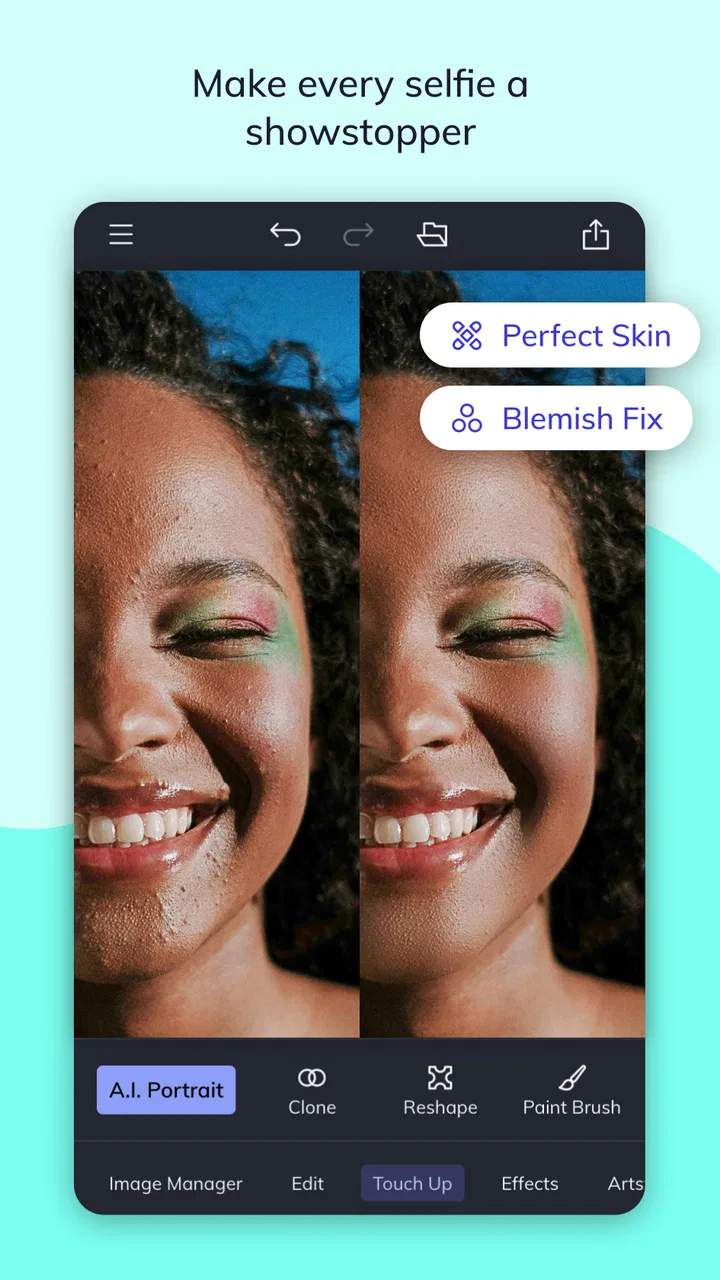
Photo Editor by BeFunky is a mobile photo-editing app designed for quick enhancements as well as more creative projects. After testing its main tools, I found options for cropping, resizing, exposure and color adjustments, filters, effects, frames, text, collages, and touch-up edits. It is suitable for improving everyday photos, preparing images for social media, or creating simple promotional graphics without needing advanced editing experience.
02Is Photo Editor by BeFunky free to download and use?
The app can generally be downloaded without an upfront purchase, but not every feature is necessarily available for free. Some premium effects, editing tools, templates, or other content may require a subscription or in-app purchase. The free version is useful for basic editing, although users should review the current pricing, trial terms, and renewal conditions in the App Store or Google Play before subscribing.
03Is Photo Editor by BeFunky easy to use for beginners?
Yes, the app is fairly approachable for beginners because its editing controls are organized around recognizable tools and visual previews. You can usually make basic corrections with only a few taps, while more advanced options are available when you want greater control. The number of filters and creative effects may feel overwhelming at first, but the interface is generally easier to learn than professional desktop editors.
04Does Photo Editor by BeFunky work offline, and does it require an account?
Basic editing may work without a constant internet connection once the app and required resources are available, but online access can be needed for downloading effects, templates, advertisements, cloud-related functions, or premium content. Account requirements can also vary by feature and app version. If you want to use the app while traveling, test the tools you need before going offline rather than assuming every feature will be available.
05Does Photo Editor by BeFunky reduce image quality or protect my privacy?
Export quality depends on the original image, the selected settings, and the tools used during editing. Basic adjustments normally preserve good quality, but repeated compression or resizing can make a photo less sharp. Privacy-conscious users should review the app’s current permissions and privacy policy, especially regarding photo access, analytics, advertising, and optional cloud features. Only grant access that is necessary for the editing functions you plan to use.
Pros
- Simple interface makes basic edits quick for beginners.
- Offers creative effects
- frames
- collages
- and touch-up tools.
- Useful batch editing features can save time on multiple photos.
- Works well for creating social media-ready images.
- Provides many templates for fast designs and collages.
Cons
- Many advanced tools and effects require a paid subscription.
- Some edits may reduce image quality when heavily applied.
- The app can feel crowded because of its many creative options.
- Ad-supported use may interrupt editing for free users.
- Export and sharing options may vary depending on the device.

Photo Editor by BeFunky
Gallery